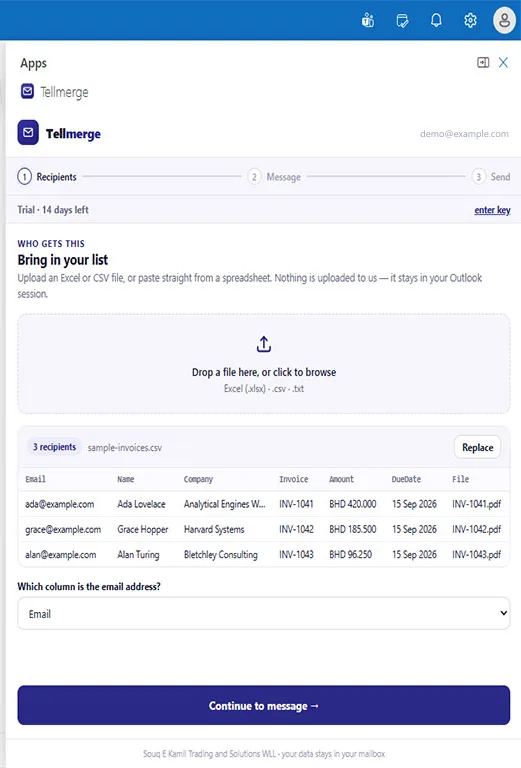
Step one
Your spreadsheet, read on your machine
Drop the file in and the rows appear as they are. Nothing is uploaded — it is parsed in the pane, in your Outlook session.
Outlook add-in · one-time price
Tellmerge attaches the right document to the right person and writes the covering note for each one. Invoices, statements, payslips, certificates — every recipient gets their own file and their own details, sent from your own Outlook mailbox.
Full product for 14 days, no card. Then $39 once — not a subscription.
Reviewed and listed on Microsoft AppSource.
Month-end means forty statements going to forty clients, each with its own PDF. Done by hand that is an hour of clicking, and it is an hour every single month.
Outlook's built-in merge runs through Word, needs classic desktop Outlook, and cannot give each recipient a different file — which is exactly the part you needed.
Sending a client somebody else's invoice is a mistake you have to apologise for. At forty attachments by hand, it is a question of when.
Three steps
Drop in an .xlsx or CSV, or paste straight from a spreadsheet — the same
sheet your accounts system already exports. Tellmerge reads it, finds the email column,
and shows you the rows so you can check them before going further.
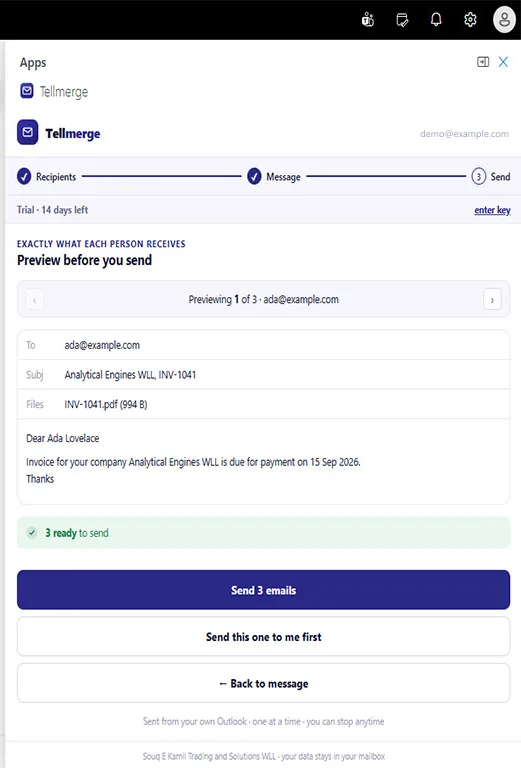
Type it once and drop in {{Name}}, {{Invoice}},
{{DueDate}} or any other column — in the subject line as well as the body.
Then point at your filename column so each row picks up its own document.
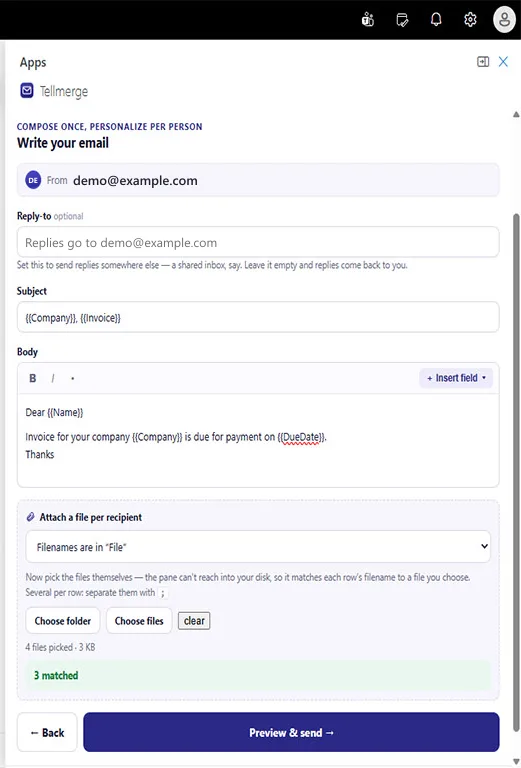
Step through the finished emails one by one — real values, real attachments, exactly what will arrive. Tellmerge sends them individually from your own mailbox, so each person sees only their own name in the To field.
The whole thing, start to finish
Step one
Drop the file in and the rows appear as they are. Nothing is uploaded — it is parsed in the pane, in your Outlook session.
Step two
Merge fields work in the subject as well as the body. Name the column holding each row’s filename and Tellmerge reports how many matched before you go on.
Saved as a template, next month’s run starts with the wording already in place.
Step three
Real values, real attachments, arrow through all of them. There is also a button that sends the first one to you alone, so you can check it in your own inbox.
Done
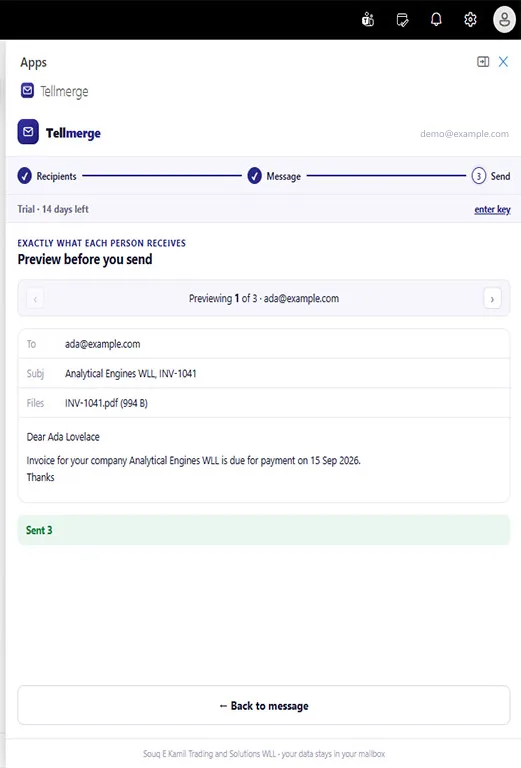
They went from your mailbox, one at a time. Replies come back to you, and your copies are filed where you would expect to find them.
Download the report if you need to show someone later: who received what, and when.
The reason Tellmerge exists
Add a column of filenames to your sheet, pick the folder those files live in, and Tellmerge pairs them up. Fifty invoices, fifty payslips, fifty certificates — one send, and every one goes to exactly the right person.
invoice A-12.pdf in the sheet finds Invoice A-12.PDF on disk. Case and stray folder paths don't break it.| Name | Invoice | File | |
|---|---|---|---|
| [email protected] | Ada Lovelace | INV-1041 | INV-1041.pdf |
| [email protected] | Grace Hopper | INV-1042 | INV-1042.pdf |
| [email protected] | Alan Turing | INV-1043 | INV-1043.pdf |
Point Tellmerge at File, choose the folder those three PDFs are in, and every client leaves with the right one attached.
Who uses it
Each of these is a merge Word cannot do, because the attachment changes with the recipient. The guides walk through the common ones — including why Word cannot attach a different file to each person.
Monthly invoices and statements of account, each with its own PDF, to clients you already trade with.
Payslips, contracts and letters to staff — one document each, and never the wrong one to the wrong person.
Delivery notes, remittance advices, renewal reminders and certificates, sent to the people expecting them.
Result slips, fee notices and attendance letters to enrolled families, individually addressed.
Reports, engagement letters and case updates to named clients, each carrying its own file.
If the list is people you already deal with and each one needs their own document, this is the tool.
Being clear about scope
It is a document utility for Outlook, in the same family as Word's mail merge. It is deliberately not an email marketing platform, and it is missing every piece of machinery one of those would have.
If you are running promotional campaigns to a subscriber list, Tellmerge is the wrong product and we would rather say so here than take your money and disappoint you.
Where your data goes
Your list is read in the task pane, on your machine. Your documents are read from your own disk. Neither is uploaded — Souq E Kamil runs no server that your clients' details or your files ever touch.
The emails go straight from your Outlook mailbox through Microsoft Graph, with the permission you grant on first use, and land in your Sent Items like anything else you send. Because that is exactly what they are.
Simple
Every feature, no tiers holding anything back, and no renewal date in your calendar. Buying for a team of five or more brings it to $29 a mailbox, and a 50-mailbox site licence is $499.
14 days free first. 14-day money-back guarantee after that.
Before you ask
Outlook on the web, new Outlook for Windows, Outlook for Mac, and Outlook on iOS and Android — anywhere modern Outlook add-ins run. It needs a Microsoft mailbox: a Microsoft 365 work or school account, or a free Outlook.com / Hotmail address.
It does not work with a Gmail or Google Workspace mailbox, even if you read that mail inside Outlook. Tellmerge sends through Microsoft's own mail API, and a Google mailbox isn't reachable from it. We would rather tell you that here than take your $39 first.
No. Tellmerge has no contact storage, no campaign scheduling, no open or click tracking, no subscriber management and no sending infrastructure of its own. It is a document utility: it attaches the right file to the right person and sends it from your own mailbox.
Our terms prohibit using it for unsolicited or promotional bulk email, and we enforce that. If you need marketing campaigns, use a marketing platform — they are better at it, and this is not one.
Tellmerge itself sets no limit, but your mailbox does, and that ceiling is Microsoft's. A single account may only send so much per day and so fast, and the cap differs by account type. Tellmerge reads the server's own throttling signal and slows to match rather than hammering through and getting your account flagged.
In practice a few hundred at a time is comfortable — which is the right size for a month's invoices and the wrong size for a marketing campaign.
They are sent one at a time from your own mailbox through Microsoft's own infrastructure — the same path as a message you type by hand. Your domain's authentication, reputation and signature rules all still apply, because nothing is relayed through us.
Yes. $39 buys Tellmerge for that mailbox, permanently, and improvements are included. No renewal, no usage metering, no feature kept behind a higher tier. We carry no per-email cost — your mailbox does the sending — so there is nothing a subscription would need to cover.
Everything works for 14 days, with no card and no limits, so you can run a real month-end before deciding. After that Tellmerge stops sending until a licence key is entered. Nothing is deleted and nothing is held hostage — your lists were never ours, and the add-in stays installed.
Yes. A key is bound to one mailbox at a time, not permanently. Open Tellmerge in the old mailbox and deactivate, and the key is free to use elsewhere. If you have lost access to that mailbox entirely, email support and we will release it for you.
No. The list is parsed inside the task pane on your own machine and the emails go straight from your mailbox to Microsoft. Our servers handle exactly two things: issuing and checking licence keys, and counting anonymous page views on this website. Neither ever touches your contacts, your files, or your message text.
Paddle, acting as Merchant of Record. They handle the card, charge VAT or sales tax where it applies, and issue a proper invoice automatically. We never see your card details. Refunds are covered on our refund page.
Fourteen days, every feature, no card. If it doesn't save you the hour you expected, you have lost nothing.